Page 4 of 4 << First ... 234
Results 46 to 53 of 53

Thread: AI Generation Tutorials  

  1. #46
    Elite Prospect Optional's Avatar
    Joined
    25 Jul 2024
    Posts
    143
    Likes
    1,084
    Images
    18,551

    Re: AI Generation Tutorials

    Quote Originally Posted by model1one_ai View Post
    What you say about losing resolution with upscaling is true in the real world but not in the AI world. In an AI picture, we cannot distinguish between right or wrong, since the person does not exist. This being said, ComfyUI comes up with generative upscaling models, which take not only the image as an input, but also the model, prompt, and VAE, and then iteratively resample the upscaled image tile by tile. This approach genrates new information to the image, which generally more than compensates the loss of quality through "normal" upscaling.
    Hi Model1one - not so many ppl here to have a discussion like that - so thanks go back to ya

    Still on the upscaling toppic: sure I know with an AI upscaler you won't run into degeneration like the tradidional bicubic and alikes. But every time an AI adds details to a image it gets changed. Maybe it's me - but this still feels like a degeneration... we need a new word here.

    To talk some tec: running a RTX3060 with 12GB VRAM here - the setup generates about 1 image every 30 secs, with a constand load around 9GB and peaks that max the 12GB out. If you wanna upgrade: go for something with at least 12GB - the system is not dying but I guess everything below that waterline will be a huge pain.

    keep creatin'!

  2. #47
    Active Member
    Joined
    29 Dec 2025
    Posts
    9
    Likes
    6
    Images
    5

    Re: AI Generation Tutorials

    Quote Originally Posted by Optional View Post
    Still on the upscaling toppic: sure I know with an AI upscaler you won't run into degeneration like the tradidional bicubic and alikes. But every time an AI adds details to a image it gets changed. Maybe it's me - but this still feels like a degeneration... we need a new word here.

    To talk some tec: running a RTX3060 with 12GB VRAM here - the setup generates about 1 image every 30 secs, with a constand load around 9GB and peaks that max the 12GB out. If you wanna upgrade: go for something with at least 12GB - the system is not dying but I guess everything below that waterline will be a huge pain.

    keep creatin'!

    Sure, the upscaler will add information, and there may be scenarios in which this is intentional and others in which you wouldn't want to see anything that disturbs the original image.

    I would call this "creativity" of the upscaler. For normal upscaling, I made best progress with the ESRGAN upscaler and a denoise 0.07 setting (0.1 may already add unwanted artefacts).

    You said 1 image every 30 secs - do you mean one iteration during the sampling process or a fully sampled image?

  3. #48
    Elite Prospect Optional's Avatar
    Joined
    25 Jul 2024
    Posts
    143
    Likes
    1,084
    Images
    18,551

    Re: AI Generation Tutorials

    Quote Originally Posted by model1one_ai View Post
    You said 1 image every 30 secs - do you mean one iteration during the sampling process or a fully sampled image?
    One Image every 30 secs. in 1344x736. No Upscale, no face refiner.

    I normally do a calibration run around 100-200 images, til I have a stable prompt with dynamic components (btw: all in automatic1111) and then let render overnight. Output is somewhere 1500 images.

  4. #49
    Active Member
    Joined
    29 Dec 2025
    Posts
    9
    Likes
    6
    Images
    5

    Re: AI Generation Tutorials

    Quote Originally Posted by Optional View Post
    One Image every 30 secs. in 1344x736. No Upscale, no face refiner.
    Ok, I see... I tried a simple workflow with your settings on my server (CPU only, 8 cores running on ComfyUI)... 40 secs per iteration. Seems you have 25 steps, so the GPU makes a speed-up of 40-50. Not too bad, but I think I'd need more than 12 GB VRAM, since I have IPAdapters with FaceID in my workflow.

    Seems like I neeed to find a sponsor who can help me with a H100.

  5. #50
    Elite Prospect Optional's Avatar
    Joined
    25 Jul 2024
    Posts
    143
    Likes
    1,084
    Images
    18,551

    Re: AI Generation Tutorials

    Quote Originally Posted by model1one_ai View Post
    Seems like I neeed to find a sponsor who can help me with a H100.
    If you find a sponsor - tell him you need two cards

  6. #51
    Active Member
    Joined
    3 Jan 2026
    Posts
    20
    Likes
    16
    Images
    504

    Re: AI Generation Tutorials

    Hi @model1one_ai
    I've posed a question in a separate thread that you might have the knowledge to provide some insight into:

    https://vipergirls.to/threads/15794884-I-...star-Options

    The Q in more detail is:

    What are the options for (AI) generating new images / video of a real pornstar?
    Let's say you have a favourite pornstar who quit the industry or ruined her tits by shoving great basketballs of silicone into them.
    Are there any accessible pathways for training AI on a select 'pornstar era' to generate new content of that pornstar?

    I am assuming this is very doable because god knows there is now a cancer of AI generated videos out there
    of political figures, actors etc which are increasingly convincing. Surely there are ways of training AI
    on a pornstar to create new content of that pornstar.

    What I have tried:
    artany AI image to video. Requires a fair bit of "tricking" with prompts but ultimately it's a tease,
    videos are short (privacy is always paramount so I only use such platforms within their free tier)
    and more often than not, the AI inexplicably changes the face / tits etc because each time it only
    has a single image to go by. Basically it's far too limited and it's not very porn friendly.

    What I want to avoid:
    - That awful AI "sheen" where the generated images have this weird ultra-smoothness to them
    - Dodgy, interpretive AI which makes changes to body type
    - Deepfake face replacement etc - not what I am after. I want to create the equivalent of new "lost" content for a given pornstar.

    I should add that I'm no tech-head, I'm a Mac user and rely on existing AI platform and such - so I'm probably right outta luck here...

  7. Liked by 1 user: nestorx

  8. #52
    Active Member
    Joined
    22 Jan 2014
    Posts
    16
    Likes
    4
    Images
    0

    Re: AI Generation Tutorials

    Nakedly

    check this one

  9. #53
    Active Member
    Joined
    29 Dec 2025
    Posts
    9
    Likes
    6
    Images
    5

    Re: AI Generation Tutorials

    Let's get back to creating...

    During the last weeks I changed some basic settings in my workflow, which have a significant effect on the output, especially if character consistency is relevant (see my post above). I have come to the conclusion that it is essential to unterstand the effect of these settings, which can only be done by experimenting with different input values. This includes a proper prompt engineering because that's a common source for mistakes, e.g. if you have contradicting input. However, even with a lot of mistakes, you can get amazing output pictures and you will never notice that there could be many improvements. But if you need many pictures of the same character, you will easily hit the frontiers of what is tolerated.

    Before going into more detail, let's recall what I want to do. The task is, starting from a single reference photo of a model (which may be either AI or real), we would like to have the same model in different settings, ‪like in a professional photoshooting. And this should work both for models that look like "professional" supermodels but also for "normal" models like you would meet them on the street, with imperfections, being of different age and so on.

    CFG scale:
    This parameter controls how close your output follows your prompt. You will find many different opinions on this parameter, and I will add mine. I found recommendations saying you should set it to below 2, if you want photorealistic output. However, at such low values, you lose the photorealistic richness of the background and many details. This can be compensated partly by adding more steps/iterations for the image generation. However, I found that character consistency, with the reference image being a condition in a similar way like a prompt, needs high CFG values such as 10, for example. This is usually considered too high for photorealistic images but can be used with certain prerequisites. Google AI says:
    "At a CFG scale of 10, the model heavily prioritizes the prompt, which can lead to high contrast and potential over-saturation or "fried" images if not managed. A strong negative prompt is essential to balance this, preventing unwanted artifacts and maintaining photorealism.
    If using CFG 10, ensure your sampling steps are sufficient (typically 25-35 steps for Euler a or DPM++ 2M Karras) to resolve the high-contrast details.
    At this scale, the model is strictly following your positive prompt. If you do not specify negative terms, the model may default to rendering elements in a "digital art" style or with poor anatomy to satisfy prompt keywords."

    Great, strictly following the prompt is exactly what we need for the reference image, and from my experiments it seems to work.

    Scheduler and Steps:
    I found the simple Euler sampler with a high steps number (at least 60, sometimes >100 is even better) superior to the widely used DPM++ because that one often produced slightly blurry output.

    Prompt:
    A proper pormpt is essential for a good result. Be sure to experiment with different keywords, weights and even the order of the keywords matters. It's very important to understand what the AI does with your input because it will not give you feedback if it doesn't understand. A common mistake I did was to write the model's age in the prompt together with a high weight. But it seems the AI didn't find this age matching with the reference input image. The result was either a bad similarity to the imput image, or the model looked much younger in the output.

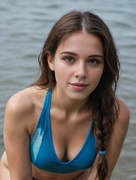
    Finally, let's have a look at an example of what can be done. Here is the reference picture:


    Full scale image here: https://www.imagebam.com/view/ME1AT3X9

    Note: This is not the original quality of the picture because I saved it in JPG format, for the purpose of this blog. Of course, the original picture is in PNG.

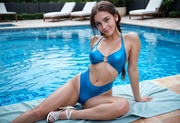
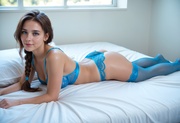
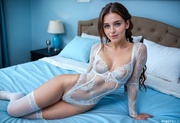
    And here are some output pictures:


    Full scale images:
    https://www.imagebam.com/view/ME1AT3X8
    https://www.imagebam.com/view/ME1AT3XC
    https://www.imagebam.com/view/ME1AT3XA

    A bit too much of blue, in my opinion, haven't figured out why this is happening.

    Please feel free to share your thoughts and ideas.

Page 4 of 4 << First ... 234

Posting Permissions